MCP server
Email verification inside your AI assistant
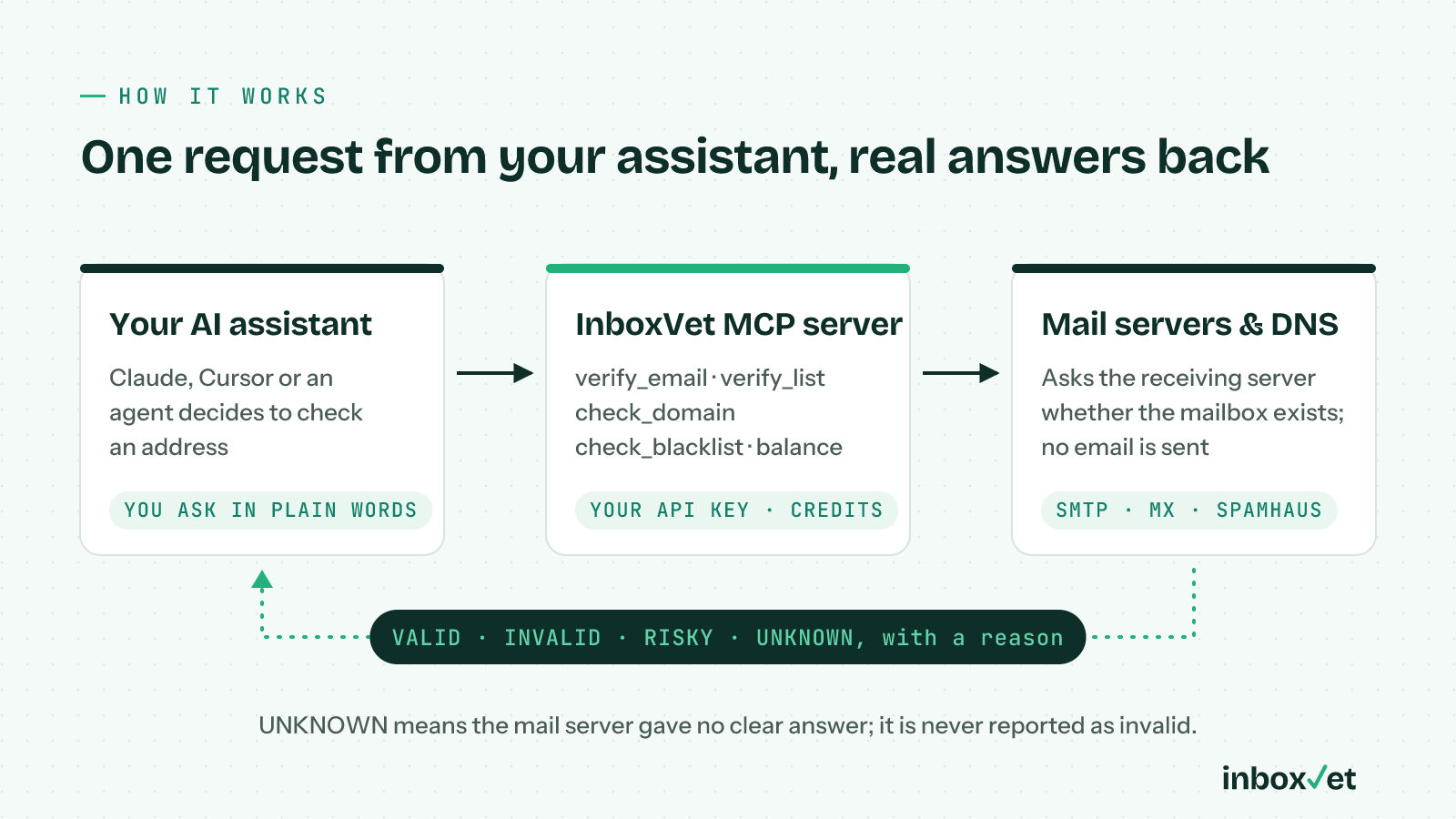
Connect Claude, Cursor or your own AI agent to InboxVet. Ask in plain words, and your assistant verifies emails, tests domains and checks blocklists for you.
https://inboxvet.com/api/mcpJust ask
What you can ask your assistant
Tools
Five tools, one API key
| Tool | What it does | Cost |
|---|---|---|
| verify_email | Full check of one address: syntax, domain, disposable, the mailbox itself and catch-all. | 1 credit |
| verify_list | Up to 100 addresses in one call, duplicates checked once, with a count per result. | 1 credit per address |
| check_domain | Email server and DNS test: MX, SPF, DKIM, DMARC, MTA-STS, TLS-RPT, BIMI and reverse DNS, with fixes. | Free |
| check_blacklist | Spamhaus blocklist lookup for a sending domain or mail server IP, with the reason for any listing. | Free |
| credit_balance | How many credits the account has left. Credits never expire. | Free |
Why InboxVet
Built for assistants and agents
Same key, same credits
Use your existing InboxVet API key. Checks come out of the same credits, and they never expire.
Honest answers for agents
When a mail server won't give a clear answer, the result is Unknown, not a guessed Invalid. Your agent won't delete real people.
No email is ever sent
We ask the receiving mail server whether the mailbox exists, then hang up. The person never sees anything.
Deliverability built in
Your assistant can also test a domain's DNS and check blocklists, free, to explain why mail goes to spam.
Set up in a minute
One line in Claude Code
Create an API key in your dashboard, then run this. Setup for Cursor and Claude Desktop is in the docs.
claude mcp add --transport http inboxvet https://inboxvet.com/api/mcp \
  --header "Authorization: Bearer YOUR_API_KEY"
Full setup guide
FAQ
MCP server: questions
What is an MCP server?
MCP (Model Context Protocol) is the standard way AI assistants such as Claude and Cursor connect to outside tools. With the InboxVet MCP server, your assistant can verify email addresses and check deliverability by itself when you ask.
Which AI assistants work with it?
Any MCP client that supports remote (Streamable HTTP) servers, including Claude Code, Claude Desktop and Cursor, and AI agents built on the MCP SDKs. Setup for each is in the API documentation.
How much does it cost?
The MCP server is free to connect. Verifying an address uses 1 credit, the same as the API; domain tests, blocklist checks and the credit balance are free. New accounts get 100 free credits.
Is my API key safe?
Your key is sent only to InboxVet over HTTPS. We recommend creating a separate key for AI tools in the dashboard, so you can revoke it on its own at any time.
Can it verify a large list?
Up to 100 addresses per call. For bigger lists, upload a CSV in the dashboard: bulk uploads check every address down to the mailbox and you download the results when they are done.